Just recently ( July 17 2009 in USA, and later dates in some countries) , Apple company have released the new iphone 3Gs , their new 2009 version of the iphone 3G product line. But as early as now , I am already hearing things about rumors that Apple is going to release another iPhone and now its going to be an Apple iPphone 4G. It is speculated to come out by year 2010 and who knows might even be earlier. With my curiousity , I checked the net and here is what I've found out: Some say the following are just some of the enhancements of this new iPhone 4G:
> front face video camera for video calling
> 64 GB memory ( now that is double t the size of the current ones)
> removable battery
> micro SD card option
> smaller size
> 5.0 mega pixels
Now here is the video of the speculated "iPhone4G". Notice that at the end of the video, it says there 2009, so that indicates there is really a posibility of releasing it not later this year. But what I am thinking of is that, 4G network is different from the 3G network. It is like 2G vs 3G. So if this 4G thingy would be true, that means that network providers have to come up with 4G networks as well and build or add new 4G towers to support this product. Anyways no one really knows what would really be the set up, until Apple officially unveil this much awaited iphone 4G. All we can do is wait. Wait and see if this would outsmart or outperform the existing ones. Good Luck!
http://www.youtube.com/watch?v=rDzMRzmf3es
Thursday, July 23, 2009

Saturday, June 20, 2009
How to download Itunes on a computer
Itunes is a free software from Apple use to download software updates for Iphones and Ipods. The steps below shows how to download the software.
1. Go to the appple website , www.apple.com/itunes/download
2. On the left section of the webpage enter your email address and click the "download now" button highlighted in blue
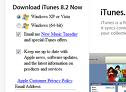
3. Once asked if you want to run or save the program just click on "run"
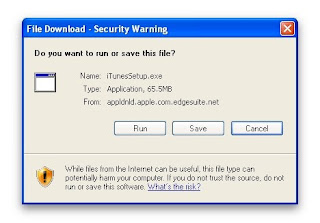
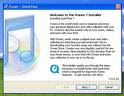
4. Then just continue with the upcoming pages like reading and accepting the terms and coniditons etc. You will then reach the download wizard
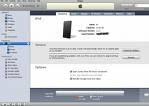
5. Once the the download is finished, this is how the itunes program will look like:
1. Go to the appple website , www.apple.com/itunes/download
2. On the left section of the webpage enter your email address and click the "download now" button highlighted in blue

3. Once asked if you want to run or save the program just click on "run"

4. Then just continue with the upcoming pages like reading and accepting the terms and coniditons etc. You will then reach the download wizard

5. Once the the download is finished, this is how the itunes program will look like:

Friday, June 19, 2009
How to do Reset Network Settings in the iPhone
Reset network settings is essential specially if your iPhone is not able to connect to a cellular data networ. Meaning you may not be able to use the iPhone either is making and receiving calls, making and sending MMS and SMS or connecting to the 3G internet. Doing the reset network setting is also applicable if the iPhone says "No service " at the top left corner of the iPhone where you should normally see the name of your network provider. The troubleshooting steps below shows you have to perform the reset network settings. It will erase whatever current connection you may have on he iPhone and then it will create a brand new connection. Your files won't be erase so you need not to worry about all the applications or information taht you have there on your iPhone.
Here are the steps.
1. From yout iPhone home screen, tap on the "Settings" icon
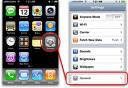
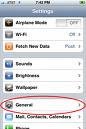
2. Onthe settings page, press on "General"
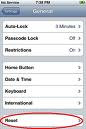
3. Then press on "Reset"
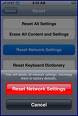
4. Then choose on "Reset network settings" , the middle option
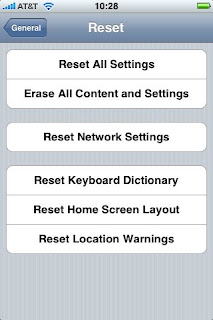
5. Then you will be asked to confirm this action, just click the red button that says reset network settings button again
7. If none of this works for your iPhone you may need to call your service provider to check if there are any restrictions on your service.
Here are the steps.
1. From yout iPhone home screen, tap on the "Settings" icon

2. Onthe settings page, press on "General"


3. Then press on "Reset"

4. Then choose on "Reset network settings" , the middle option

5. Then you will be asked to confirm this action, just click the red button that says reset network settings button again


6. You will then see an Apple logo on the screen, just wait a couple of minutes and it should turn on again by itself and your done
7. If none of this works for your iPhone you may need to call your service provider to check if there are any restrictions on your service.
Thursday, June 18, 2009
Troubleshooting Iphone 3.0 software update issues
During software updates , you might encounter different error messages like no network connection, iphone not detected etc.If you are having troubles with upgrading your Iphone with the new operating sytem 3.0 or any version to come , try doing the following troubleshooting steps.
1. First make sure that you have internet connection is working on your computer. Check your computer if it is connecting to other websites, if not you have to contact your service provider. You may also want to restart your computer and your internet connection as well
2. Ensure that you have the latest Itunes version, as of this writing the latest Itunes is 8.2. If you don't have this yet, type the word "Itunes" the search field above and download the latest one.
3. Make sure that your USB cable is firmly attached to the USB port of your computer while the other end is also firmly attached to the iPHone.
4. Try unplugging the ipHone from the computer and plug it in to a different USB port then try the update again
5. If update still not pushing thru, uninstall and reinstall itunes
6. If uninstall and re install won't fix the issue, use another computer and make sure it also has latest Itunes.
7. If issue is still not resolved, unplug the iphone from the computer.
8. Turn off the iphone by pressing the power button on top.
9. Now, press and hold the two buttons, one is the home button (underneath the screen) and the other one is the power button again on top. Press and hold them both for aboit 10 to 15 seconds.
10. Once a logo comes out on the screen, connect it immediately to the USB port of the computer and then try doing again the update.
***If update still won't go thru, go to your service center and ask for further assistance
1. First make sure that you have internet connection is working on your computer. Check your computer if it is connecting to other websites, if not you have to contact your service provider. You may also want to restart your computer and your internet connection as well
2. Ensure that you have the latest Itunes version, as of this writing the latest Itunes is 8.2. If you don't have this yet, type the word "Itunes" the search field above and download the latest one.
3. Make sure that your USB cable is firmly attached to the USB port of your computer while the other end is also firmly attached to the iPHone.
4. Try unplugging the ipHone from the computer and plug it in to a different USB port then try the update again
5. If update still not pushing thru, uninstall and reinstall itunes
6. If uninstall and re install won't fix the issue, use another computer and make sure it also has latest Itunes.
7. If issue is still not resolved, unplug the iphone from the computer.
8. Turn off the iphone by pressing the power button on top.
9. Now, press and hold the two buttons, one is the home button (underneath the screen) and the other one is the power button again on top. Press and hold them both for aboit 10 to 15 seconds.
10. Once a logo comes out on the screen, connect it immediately to the USB port of the computer and then try doing again the update.
***If update still won't go thru, go to your service center and ask for further assistance
How to do software upgrade for an Iphone
The steps below shows how to upgrade the software of an Iphone. As of this writing the latest version released by Apple is the Iphone OS 3.0. But if there will be new versions to come out it will have the same exact process. If there will be any changes I will keep it posted in this blog. Upgrading the Iphone's software is very easy, the upgrade may take about 15 mins at the least but may also take a bit longer than this depending on your computer's performance. Make sure you have all the follwing to do the upgrade:
> USB cable
> Iphone
> Computer with the latest version of Itunes.( If you don't have one yet you can type in the wor "Itunes"on the search field above to get your copy. The general procedure on how to download the Itunes software can also be found on this blog, just look for the topic "Iphone Operating system 3.0 ").
Here are the steps:
1. Open latest version of Itunes
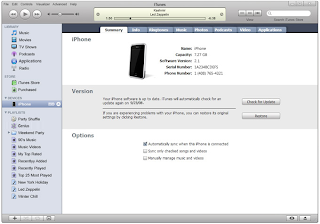
2. Connect your Iphone to the USB port of your computer.
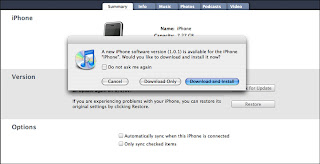
3. On some occasions, you might see a pop up box on your computer screen stating "A new iphone software version ( 3.0 or whatever comes available ) is available for the Iphone, would you like to download and install it now?" Just click on the "download and install"button. If you do not get this message box, proceed to the next step onwards.
> USB cable
> Iphone
> Computer with the latest version of Itunes.( If you don't have one yet you can type in the wor "Itunes"on the search field above to get your copy. The general procedure on how to download the Itunes software can also be found on this blog, just look for the topic "Iphone Operating system 3.0 ").
Here are the steps:
1. Open latest version of Itunes

2. Connect your Iphone to the USB port of your computer.
3. On some occasions, you might see a pop up box on your computer screen stating "A new iphone software version ( 3.0 or whatever comes available ) is available for the Iphone, would you like to download and install it now?" Just click on the "download and install"button. If you do not get this message box, proceed to the next step onwards.

4. On the left section of Itunes, you must see a "DEVICE"category. Underneath it, click the word "Iphone", it also have a small picture of it. If your Iphone cannot be detected by itunes, try to unplug the iphone from the computer and connect it on another USB port.
5. After clicking the iphone icon, you must see a summary screen on the main section of Itunes.
6. On the summary screen, you will see the "VERSION"section at the middle. Once there is a new software realese, there will be a message there that goes "A new version of the Iphone software is available, version 3.0 ( or whatever version is currently available). To update your iPhone click the "UPDATE"button.
7. The upgrade process will take place. The progress will be shown on your computer screen, stuffs like backing up files, copying files or transferring data etc will be prompted. Just allow about 15 mins or so to finish the update and you're done. You can then unplug the iphone from your computer
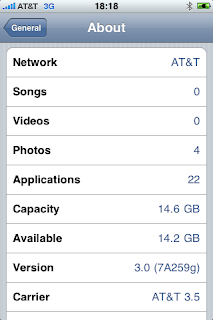
8. To verify if your softaware is been updated to the latest version, to your Iphone. Click on Settings> General > About > Version, under version you must see the there the latest update you got from Itunes

Subscribe to:
Posts (Atom)
-
 What does hard reset do for an Iphone? Doing the hard reset is normally recommended for resetting the hardware aspect of the IPhone. If we a...
 -
 Reset network settings is essential specially if your iPhone is not able to connect to a cellular data networ. Meaning you may not be able t...
 -
During Iphone activation, there might be some issues or technical difficulties that you may come across. Below are few issues that you may e...